Job Listing
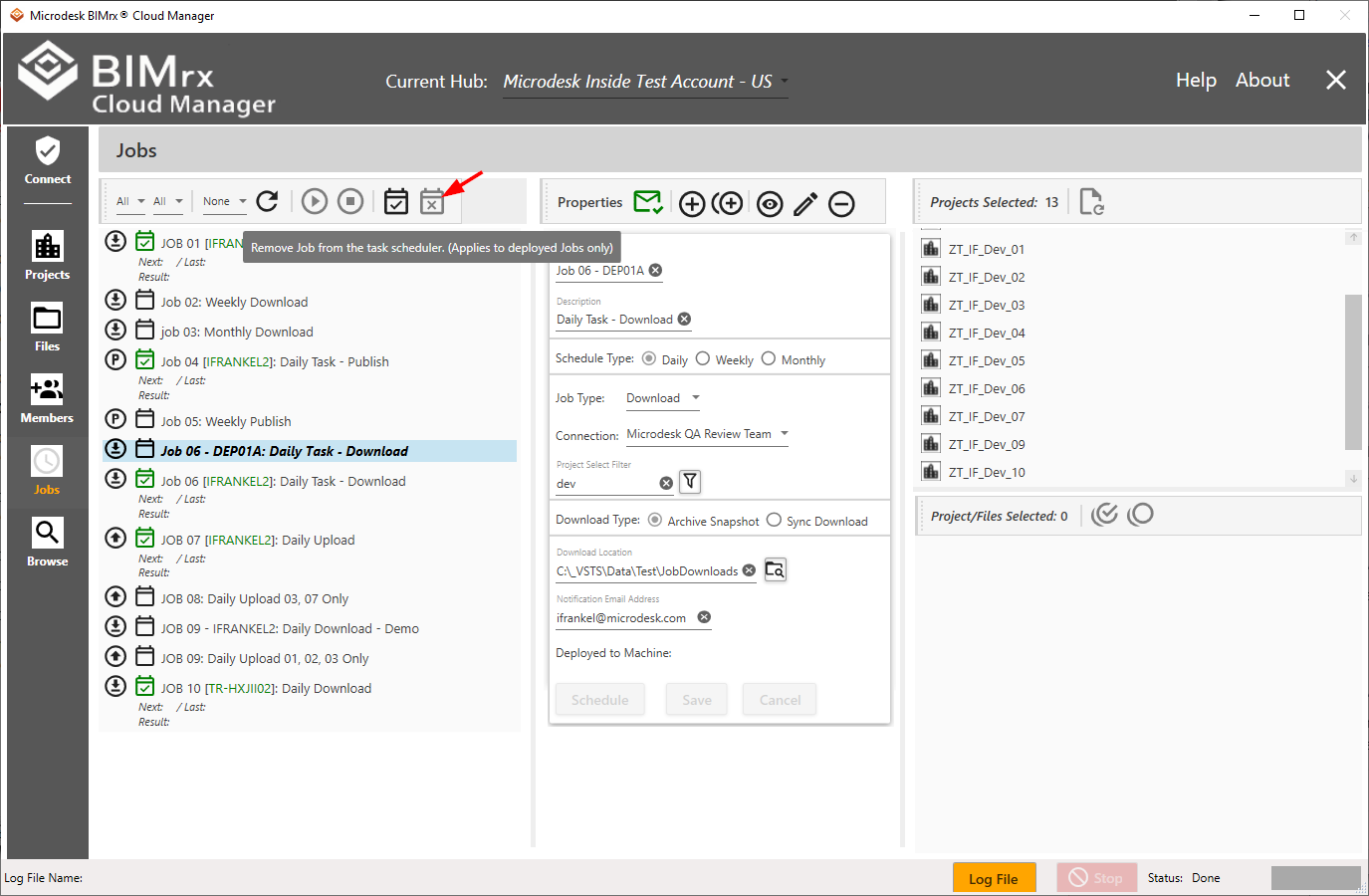
The BIMrx® Cloud Manager Listing features a fully featured Job browser. This browser allows the user to navigate between Jobs, allowing a Job to be selected so it can have various operations performed on it. With a Job selected, access becomes available to perform the following Job maintenance operations, as described in the preceding sections:
- Add
- Copy
- View
- Edit
- Delete
The Listing browser also provides access to the following operations:

- Job Type Filter
- Server Filter
- Server Location Refresh Filter
- Refresh data from Task Scheduler
- Run deployed Job
- Stop running Job
- Deploy to Task Scheduler
- Remove from Task Scheduler
Each Job contains information displaying its Job Type and status. For Jobs deployed to the Task Scheduler, this also includes certain elements of runtime information.
Finally, a filter is provided to specify the type of Jobs displayed and a refresh button to ensure the Task Scheduler status display is current.
Please Note—BIMrx® Cloud Manager utilizes enabling and disabling buttons here, as throughout the application, to control access to specific functionality. What this means is when a button is grayed out it is not available for access. For example, with an undeployed Job selected, the Run and Stop buttons are not available.
Tip—Use button tool-tips to learn why a button is disabled and what must be done for it to become enabled for use.