Status Display
The Jobs Listing, in addition to facilitating Job navigation and selection, also provides information regarding Job status.
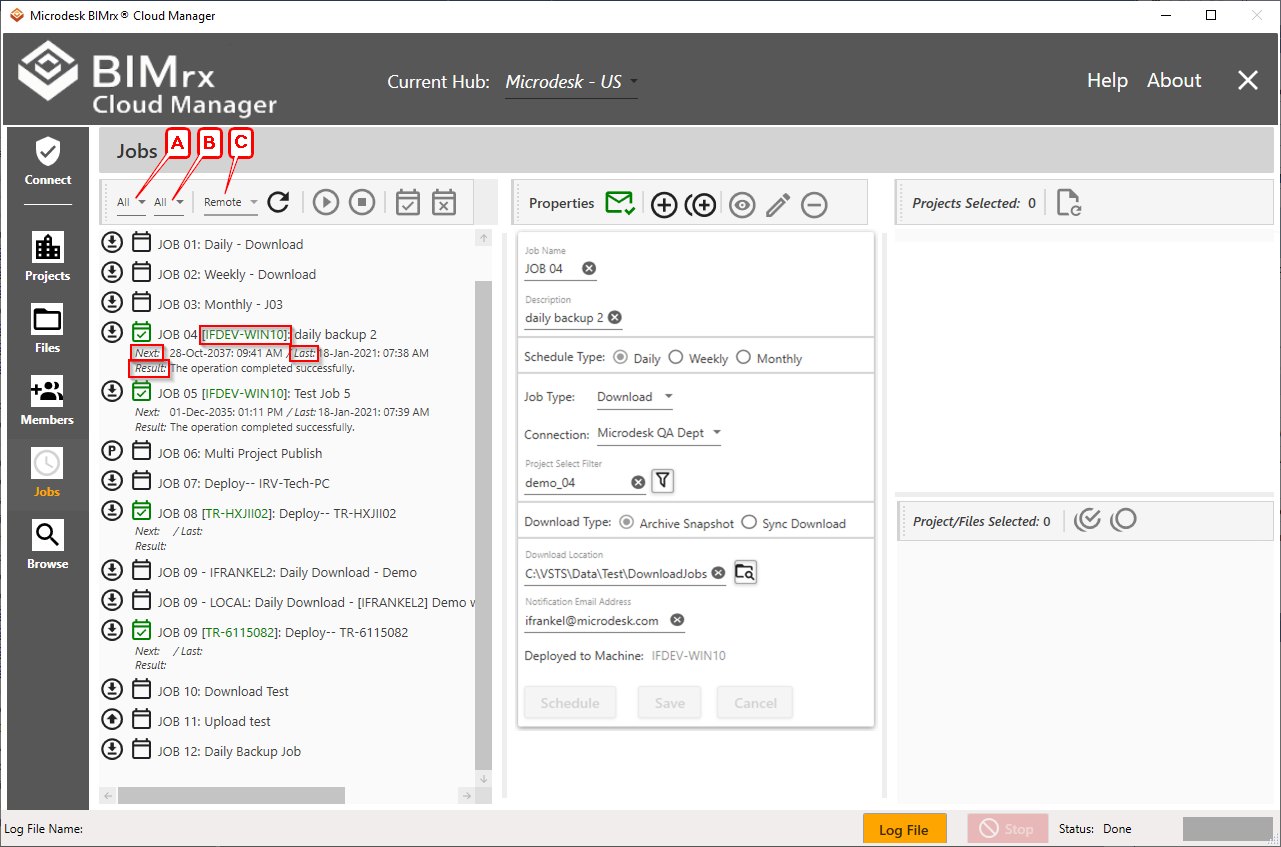
The Job Type Filter A and Server Filter B control which Jobs are displayed. The Server Location Refresh Filter C controls which server location categories—local, remote or none—have their status data refreshed.
The following icons and informational fields provide Job status information. The Job Type Icon and Deployment indicator display for all Jobs, both deployed and not deployed. The Next run date and time, Last run date and time, and last Result status only display for deployed Jobs.
- Job Type Icon
 Upload/
 Download/
 Publish—This icon indicates the Job Type and displays regardless of whether the Job has been deployed to the Scheduler or not.
 - Deployment Icon
 Deployed /
  Not Deployed —A checked green calendar indicates the Job has been deployed to the Task Scheduler. When the icon is the normal color and unchecked, it indicates the Job has not yet been deployed.
 - Server Name—The Server name is shown as green between brackets, right after the Job name and before the Job description.

- Next—The next scheduled Job run date and time.
- Last—The most recent Job execution date and time.
- Result—Task Scheduler Job status. When a newly deployed Job has not yet run, this is stated as such. Otherwise, the result of the most recent run is displayed—success, failure due to xxx, etc.